Meet Plumsense at IAAPA Expo 2026 · Booth W2282 · Orlando, FL · Nov 17–20, 2026
 Visit us at www.plumsense.com


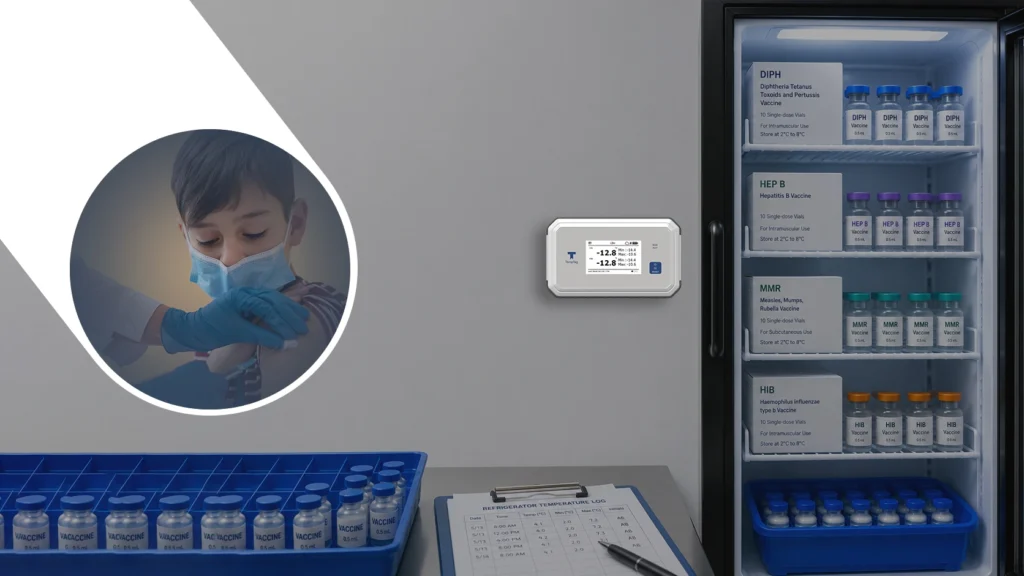
VFC temperature monitoring becomes more difficult as clinics add vaccine storage units, staff members or locations. Basic refrigerator monitors may show the current temperature, but growing clinics often need continuous records, alerts, organized calibration documents and easier access to audit reports.
Common problems include missed manual checks, unnoticed after-hours temperature changes, expired calibration certificates and incomplete excursion records. These gaps can create vaccine storage risks and make VFC reviews more stressful.
This guide explains the most common VFC temperature monitoring and compliance failures, how clinics can fix them and what to consider when selecting a monitoring system.
What Is VFC Temperature Monitoring?
VFC temperature monitoring means tracking the temperature of refrigerators and freezers used to store vaccines under the Vaccines for Children program. Clinics need to make sure vaccines stay within the required temperature range during storage.
A clinic may use vaccine refrigerators, freezers, data loggers, probes, displays, and alerts to monitor conditions. The goal is simple: protect vaccines from temperature problems before they become serious.
For many clinics, the challenge is not understanding that monitoring is important. The real challenge is doing it every day without mistakes. As clinics grow, a basic vaccine refrigerator monitor may no longer provide enough visibility, reporting or alert support for staff.
Common VFC Temperature Monitoring and Compliance Failures
1. Manual Logs Are Easy to Miss
Many clinics still depend heavily on manual temperature logs. Staff members may check the temperature in the morning and evening, but busy clinic hours can make this task easy to forget.
Manual logs also do not show the full picture. A refrigerator may be fine at 9 AM, but it may go out of range at night or during the weekend. If the clinic only checks temperatures during office hours, important changes can be missed.
This is one of the biggest reasons clinics struggle with vaccine temperature monitoring. Manual checks are useful, but they should not be the only method used.
2. Staff May Not Review Min/Max Temperatures Properly
For vaccine storage, it is not enough to only look at the current temperature. Clinics also need to know the minimum and maximum temperatures reached during the monitoring period.
Some clinics forget to check min/max readings, or staff may not fully understand why they matter. The current temperature may look normal, but the unit may have gone too warm or too cold earlier.
This can create a false sense of safety. A digital data logger with clear display readings can make this easier for staff to review.
3. After-Hours Temperature Changes Go Unnoticed
Temperature problems do not only happen during clinic hours. A refrigerator door may not close fully. A power issue may occur. A freezer may fail overnight. A storage unit may be overloaded or placed near heat.
If no one receives an alert, the problem may not be noticed until the next day. By that time, the clinic may need to investigate whether vaccines were affected.
Real-time alerts can help teams respond faster. This is one of the main reasons clinics move from basic manual logs to connected vaccine temperature monitoring systems.
4. VFC Calibration Records Are Missing or Expired
VFC calibration documentation helps clinics confirm that their temperature monitoring devices are producing reliable readings. A common problem occurs when calibration certificates are expired, stored separately or unavailable during an inspection.
Clinics should keep the following information organized for every primary and backup monitoring device:
- Device name and serial number
- Calibration certificate
- Calibration date
- Measurement uncertainty
- Certificate expiration or next calibration date
- Device location and assigned storage unit
Clinics should review calibration dates regularly and plan recalibration before a certificate expires. Backup devices should also have current records so monitoring can continue when the primary device is being serviced or calibrated.
5. Backup Data Logger Planning Is Weak
Many clinics focus on the primary monitoring device but neglect backup planning. If the main data logger fails, loses battery, or needs calibration, the clinic still needs a way to monitor vaccine temperatures.
Without a backup plan, staff may rush during an emergency. This can lead to poor documentation, confusion, or delayed action.
A backup data logger and a written response plan can help clinics stay prepared.
6. Vaccine Storage Units Are Not Checked Often Enough
Sometimes the problem is not the data logger. The refrigerator or freezer itself may not be working well. Older units, poor door seals, overcrowding, or incorrect vaccine placement can cause temperature fluctuations.
Clinics should not treat the refrigerator as a “set it and forget it” system. Staff should review storage conditions, avoid overpacking, keep vaccines in the right areas, and respond quickly to alerts.
A monitoring system can show patterns over time, such as repeated temperature swings or frequent door-opening issues.
7. VFC Audit Documentation Is Hard to Find
VFC audit documentation can become difficult to manage when temperature logs, digital reports, calibration certificates and excursion records are stored in different places.
Clinics should keep the following records easy to access:
- Daily temperature and min/max records
- Downloaded data logger reports
- Current calibration certificates
- Temperature excursion reports
- Corrective actions and follow-up records
- Vaccine storage and handling procedures
- Staff training records
- Primary and backup device information
A centralized digital record can reduce audit preparation time and help clinics identify missing information before a review. Staff should also know where these records are stored and how to retrieve them when needed.
How Clinics Can Fix VFC Temperature Monitoring Problems
Use a Digital Data Logger for Each Vaccine Storage Unit
A digital data logger helps track temperature continuously. Instead of depending only on manual checks, clinics can collect a clear temperature history for each vaccine refrigerator or freezer.
This helps staff see what happened during the day, overnight, and on weekends. It also supports better decision-making if a temperature excursion occurs.
Choose a Device with Display Visibility
A display device is helpful because staff can check the current, minimum, and maximum temperatures without opening the storage unit. This reduces unnecessary door opening and makes daily checks easier.
For busy clinics, a clear display can save time and reduce mistakes. Staff should be able to see the reading quickly and understand whether action is needed.
Set Up Alerts for Temperature Excursions
Alerts are important because they help clinics act faster. If a refrigerator or freezer goes outside the expected range, staff should know as soon as possible.
A good alert process should include who receives the alert, what action they should take, and how the event should be documented. Alerts are helpful only when they are connected to a clear response plan.
Keep Calibration and Temperature Records Organized
Clinics should keep calibration certificates, temperature reports, and event records in an easy-to-access place. Staff should know where to find them and how to share them when needed.
Digital reporting can make this much simpler. Instead of searching through paper files, clinics can review records in a more organized way.
Train Staff on Daily Monitoring Steps
Even the best device cannot fix a poor process. Staff should understand how to read the device, check min/max readings, respond to alarms, and document actions.
Training should not be limited to one person. If the vaccine coordinator is unavailable, another trained staff member should know what to do.
What to Look for in the Best Temperature Monitoring System for VFC Clinics
The best temperature monitoring system for a VFC clinic depends on the number of vaccine storage units, staff workflow, alert requirements, reporting needs and available budget.
Clinics should compare the following features:
- Continuous temperature logging
- Clear current and min/max readings
- Local and remote temperature alerts
- Easy access to historical data
- Downloadable reports
- Calibration record management
- Backup monitoring options
- Support for multiple storage units or locations
A small clinic may only need a simple display and data logger. A growing clinic may benefit from connected monitoring, centralized reporting and remote notifications.
An affordable system should not simply have the lowest purchase price. It should also reduce manual work, make documentation easier and provide the features the clinic actually needs.
How Temperature Monitoring Systems Support VFC Vaccine Compliance
A temperature monitoring system can support VFC vaccine compliance by giving clinics a consistent way to collect, review and document vaccine storage data.
A suitable system should help clinic staff:
- Monitor each vaccine refrigerator or freezer
- Review current, minimum and maximum temperatures
- Receive alerts for temperature excursions
- Access historical temperature records
- Download reports when required
- Keep calibration documentation organized
- Document excursion responses and corrective actions
Technology alone does not guarantee compliance. Clinics still need trained staff, written procedures, backup monitoring plans and consistent documentation.
When Clinics Outgrow Basic Vaccine Refrigerator Temperature Monitors
Clinics often outgrow basic refrigerator monitors when a local display no longer provides enough information across multiple staff members, storage units or locations.
Manual checks only show what the temperature was at the time someone looked. Digital monitoring gives a more complete view.
With digital vaccine temperature monitoring, clinics can:
- Track temperatures continuously
- View current and past readings
- Check min/max temperatures
- Receive alerts when something changes
- Download reports when needed
- Reduce manual record errors
- Respond faster to storage problems
This does not mean staff can ignore the process. It means the staff has better tools to manage it.
How Plumsense FX100 and FX500 Can Support Vaccine Temperature Monitoring
The TempTag FX100 and TempTag FX500 can be useful for clinics that need better vaccine refrigerator and freezer monitoring. These devices can help teams view readings, monitor storage conditions, and keep better records.
For clinics handling VFC vaccines, the right monitoring setup can reduce stress during daily checks and make documentation easier. Plumsense can support healthcare teams with solutions that fit clinical storage needs, including vaccine storage, pharmacy storage, and other temperature-sensitive areas.
Clinics should review their monitoring, calibration, and documentation requirements before selecting a device. Requirements may vary depending on the clinic’s immunization program, storage setup, and local guidance, because full compliance depends on the clinic’s complete process, state requirements, staff training, calibration, and documentation.
Simple Checklist for Clinics
Clinics can improve VFC temperature monitoring by following a simple checklist:
- Use a digital data logger for each vaccine storage unit
- Check current, minimum, and maximum temperatures
- Keep calibration certificates updated
- Set alert limits and response steps
- Train more than one staff member
- Keep a backup monitoring device available
- Review temperature reports regularly
- Document every temperature excursion
- Follow state and local immunization program guidance
This checklist can help clinics find gaps before they become serious problems.
Conclusion
Clinics struggle with VFC temperature monitoring for many reasons. Manual logs can be missed, after-hours temperature changes may go unnoticed, calibration records may not be ready, and staff may not have a clear response plan.
The fix is not only buying a device. Clinics need the right monitoring setup, trained staff, organized records, and a simple process that can be followed every day.
Digital vaccine temperature monitoring can make this work easier. With tools like FX100 and FX500, clinics can improve visibility, reduce manual errors, respond faster to temperature issues, and keep better records.
Plumsense helps healthcare providers monitor vaccine storage conditions with practical solutions designed for clinical environments. For clinics managing VFC vaccines, a monitoring process can protect vaccine inventory, support daily operations, and make temperature documentation easier to manage.